Nuffnang Leaderboard AD

Showing posts with label Technology. Show all posts

Friday, January 01, 2016

Hide Android Soft Keys on Android One G1 without Root

First of all, HAPPY NEW YEAR~! My New Year's Resolution for this blog would be to at least post more entries this year compared to the last one. Here's to 2016! *cheers*

Ok moving on...

Some Android phones like my Cherry Mobile Android One G1 have on screen navigation buttons. These allow for smaller phones as there's no need for hardware buttons that are prone to bork out. These "soft keys" have its downsides. Some apps are incompatible with phones that have soft keys, one example is: Snapchat.

The latest version of Snapchat still doesn't support soft keys. Enabling Auto-rotate will enable you to take a pic/video and hit the next button. The next step involves choosing the recipient. However, this screen does not rotate, so you won't be able to actually send a pic/video:
Snapchat Camera with Soft Keys

Snapchat Send screen with Soft Keys
Attempting to chat with a Snapchat friend is even more frustrating. The soft key bar will be covering the text box and this screen also doesn't rotate. You wouldn't be able to type a message to send at all!

Snapchat with Soft Keys
Now here's a fix that wouldn't require you to root your android device:

GMD Full Screen Immersive Mode

Settings
Take note that here's a PRO version:

Snapchat PRO version 160.07 PHP
PRO features
PRO version restrictions
But the free version was more than enough to fix my Snapchat problem. When you click the text box, the keyboard won't immediately show up. The app warns you about this. (I wasn't able to take a screenshot of the pop-up.)
GMD turned ON - Chat
What you need to do is to swipe up to make the soft key bar appear and then click on the chat box. The keyboard will be pulled up and you can now type!
GMD in action - Chat
GMD in Action - Snapchat Camera
Of course there are other ways of hiding soft keys. I find that this one is the most user friendly option since alternate solutions would require you to root your device. For now I'll be keeping GMD Full Screen Immersive Mode installed on my phone.

Download GMD Full Screen Immersive Mode app HERE.

I hope that helped!

What app/s are you using that doesn't support soft keys? Did this app work for you? Share it on the comments below!

Monday, December 14, 2015

Shopee PH Review - How to Order

I've been using Shopee PH for a while now. Found out about the app through one of the Fb pages I follow: GWYSHOP. This post would be a general "How To" guide on how to use the service. If you want to just dive in and try out the app yourself, download the app: HERE.
How to Shop:
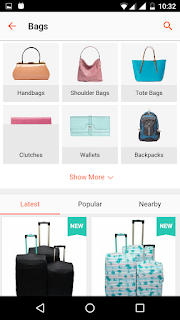
Browse the Shopee Mall and choose an item for sale

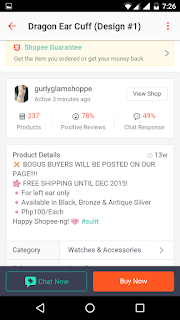
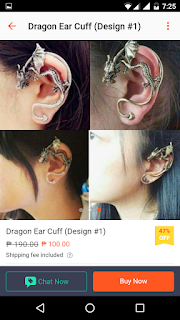
Info about the seller and the item are provided on the item's page.

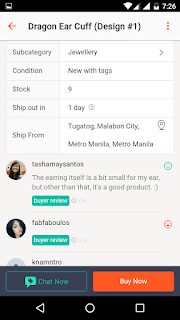
You can also see comments posted by other buyers and the seller's replies.

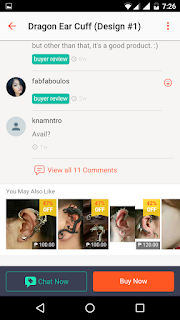
Shopee also lists similar items on the bottom of the page which are not necessarily from the same seller.
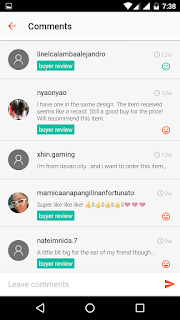
View all comments
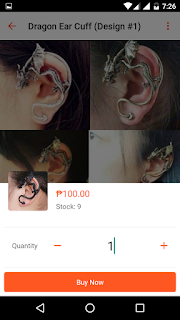
When you click "Buy Now" you only choose the quantity of the item.

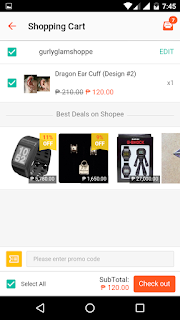
Checkout page. Here is also where you should apply discount codes.

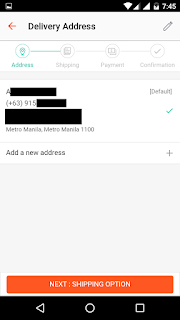
Finalize chekout: Address, Shipping, Payment, Confirmation

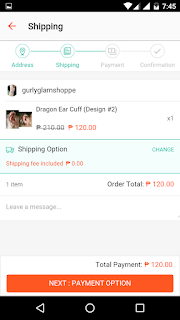
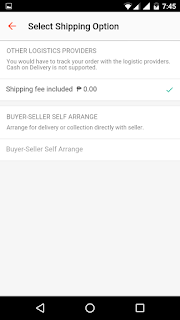
Shipping

If the seller doesn't offer free shipping, this is where you choose the shipping method you prefer.

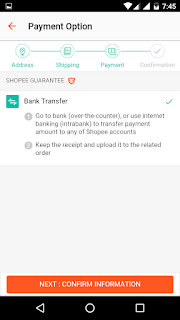
Payment method.
If you're familiar with Dragonpay. Buying from Shopee is similar. I personally used the BPI app to pay for my orders. Take note that it takes 1-2 days to process and confirm your payment. For me it almost always took 2 days.
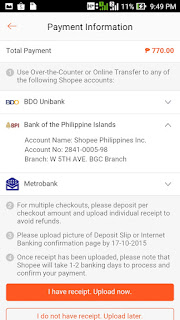
Here's a sample from one of my orders. If you pay through the BPI or Metrobank app, you can send a screenshot instead.
Once you pay for your order, the seller has a set number of days to ship your item. This will vary per order and will be indicated in the order details. When you receive your order you will have to go to the "To Receive" tab and confirm the receipt of your item so that Shopee can release your payment to the seller.
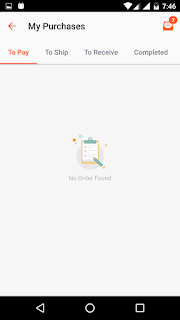
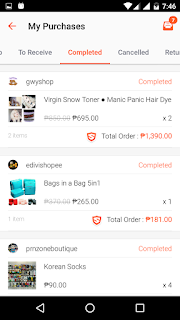
Under the Me tab, if you click on My Purchases you can track your orders which are conveniently categorized into To Pay, To Ship, To Receive, Completed, Cancelled, and Return / Refund.

Here's what my Completed tab looks  

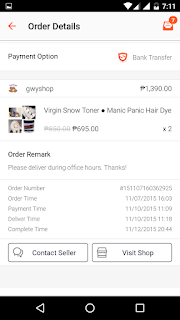
Shopee keeps detailed info on every single order. You can see when I ordered, payment time, delivery time and completion times.

Aaand that's all there is to it!

PROs and CONs

+Since I registered a couple of months ago, more and more of the local Fb shops I follow are registering on Shopee.
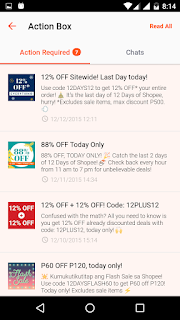
Use all the codes! (jk you obvs just use one at a time)
+Because Shopee is generous when it comes to giving out discount codes. Most of the shops I follow post their items on Shopee for around 10-20% less compared to their prices on their Fb shops! WHAT SAVINGS!


+That, coupled with the Shopee Guarantee is a win-win for both buyers and sellers. What is the Shopee Guarantee?

Shopee protects you by holding your payment until you confirm that you have received your goods. The payment is then released to the seller. 

That's definitely something that Fb shops cannot offer. For more details, please read the FAQ HERE.

+Like most e-shopping apps, Shopee has a website. As a buyer, you can browse the Shopee Mall. As a seller, you can go to the Seller Centre. I haven't tried using the website version of Shoppe so I can't give you feedback about it. If you try it though, please share your experience in the comments section below!

-Faulty Notifications
It seems that the app doesn't have push notifications. You only receive a notification about unread messages when you open the app. After several updates since I ordered, it's still broken!
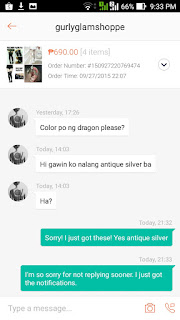
I didn't receive the notification until I opened up the app!

-If you noticed above, when you click Buy Now, you can only choose the quantity of the item. There's still no system for the buyer to choose what color/design/size to buy.

TIP: While the app indicates how many items the seller has in stock, you should make it a habit to confirm with the seller first before ordering.

-No Categories available when viewing individual shops. The only sorting used is that the Out of Stock items are at the end of the page. Other than that, there's no way to filter or sort the seller's items.
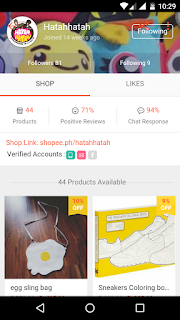
The seller's page lists all items without categories.

Compared to when you browse the Shopee Mall:
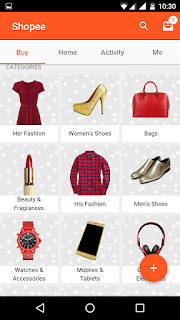
Basic Categories

Extended categories page
Shopee replies to some reviews posted on it's Play Store page. They are claiming they're working on these issues. I hope so, but I'm not holding my breath. At least I can confirm that it works on Android's Marshmallow update! Unlike other apps... *cough

Overall, Shopee is a solid app and all of my Fb stores should be on it! ;p The Shopee Guarantee saves me the trouble of setting up a meetup, and/or the anxiety of wondering if I'll ever receive my items or if the seller ran away with my hard-earned money!

This might be first of my Shopee entries. I have a few purchases that I could post a review of. 'Til next time!

Have you tried Shopee yet? What's your favorite shop? Post your comments and suggestions below!


Friday, August 07, 2015

How to Enter Negative Values on the eBIRforms v5.0 [Tutorial]

Update 09/15/2015: eBIRforms version 5.1 is live! Download it here: http://ftp.pregi.net/bir/ebirforms_package_v5.1.zip

I've spent the better part of last weekend finding a way to enter negative values on BIR's eBIRforms and found no solutions posted online. Trying to input a number with the - minus sign, or the ) parentheses is simply not possible! I tried calling the BIR Hotline, but concerns regarding eFPS and eBIRforms can only be answered during regular business hours. I had no choice but to wait until then to call. I wasn't surprised that I was put on hold for almost half an hour before my call was even answered. To save you all that trouble, I'm writing this tutorial on how to input negative numbers on the eBIRforms v5.0.

Before we proceed, the disclaimers: I am not affiliated with the BIR nor am I a CPA. So I'm afraid I won't be of any help should you have other questions about eBIRforms. You are however still welcome to post in the comment section below, and let's hope someone would be able to provide an answer to your inquiry.

Moving on, first you need latest version of eBIRforms as of writing, that would be version 5.0. Download it HERE

Always make sure you're using the latest version of eBIRforms
STEPS:

  1. Open a word processor program. (Doesn't matter what program you use, you just need to be able to type the negative value you want to insert into the form).
  2. Enter the value with the - minus sign. (Do not use commas!)
  3. Copy the text. (Cut will work too, but with copy you don't have to retype the entire thing if something goes awry.)
  4. Paste the text onto the cell. Use CTRL+V. (Right clicking will not work!)
Below is a visual tutorial. Click photos to embiggen.

NOTE: I'll be using Item 35 of the 1701Q form. Since that's the form and the cell that I needed to input negative values in.

Here are samples of word processor programs that I tested this method on:


Google Docs
Notepad
Sticky Notes
This is how it would look like when you copy the negative value into the form:
Remember to use CTRL+V
Once you click outside of the cell, eBIRforms would automatically add the comma (if applicable) and perform proper the computations.
Negative value entered!
!!REMINDER!!
BIR Form 1701Q is due on the 15th of August!

Now you know how to enter negative values on the eBIRformsThat's all there is to it! It's a damn shame that I had to wait days before I was able to find out the solution to this issue. I hope the next version of the eBIRforms would enable taxpayers to input negative values without needing to resort to any workarounds. 

Please feel free to share this post. Please leave a comment below if it this post helped you. Thank you!

BIR CONTACT CENTER
Telephone: (02) 981 8888
Email: contact_us@cctr.bir.gov.ph 

Wednesday, June 17, 2015

SKK Aura Unboxing with UI & App Screenshots


SKK Aura
I bought this unit at SKK's Robinsons Metroeast branch for 2,999 Php. Got this one for my dad to replace his MyPhone Rio Lite that I reviewed a year ago.

If you're looking for benchmark results, stress tests, and sample shots, I'm pretty sure the local tech blogs will post their own reviews soon. This is more of a photo blog of my unboxing and a dozen or so screenshots of the SKK Aura's UI and apps.


Eco bag and Box
Box (back)
Box (left side)
Box (right side)
Box (bottom) 12-Month Warranty
What's in the box?


Unit, Manual, Warranty Card, Earphones, Charger, Tempered Glass and wipes
Everything in the box except the unit
Free Tempered Glass and wipes
Charger
SKK Aura
Screen on
Screen on (with flash) 
SKK Aura (back)
Back and battery (with back cover removed)
Sim and MicroSD card slot
The MicroSD card slot is also the one that's 3G. The regular sim card slot is only 2G.

SKK Aura running on Android KitKat
UI

No app drawer.


Camera


Camera Widget

I find this widget amusing as heck! 


If you press the middle button of the widget, the photo of the DSLR camera will turn into a viewfinder. Clicking it again will take a pic!


Clicking the left camera button will return the widget back into a photo of a DSLR camera.


Recently taken photos will be displayed at the bottom like so. Photos taken with this widget will have a timestamp at the bottom with a 'polaroid' effect. See:

Camera widget photo

Clicking the photo will bring up 2 options, share and delete.

Share
Clicking share will bring up this menu.

Beauty


Theme
(I'll try to update this section when I get a hold of my dad's phone again.) I thought this folder would contain camera apps like BeautyPlus or Camera 360. But it's actually customization apps. The Theme app offers 4 free themes that have different icon sets. All the wallpapers used by the themes are available in the Wallpapers gallery.

Music

Native Music app
Dad doesn't really listen to music so there's nothing to be displayed here. I'll try to update this section too if I can.

Settings
Settings
If I update I'll add the bottom part of the Settings.

About phone

About phone
FM Radio 


FM Radio
File Explorer

Quick View

Images

Video

Audio

Documents

Applications

Internal Storage

External Storage

Notes

Basic Note app. If you want something that's cross device/platform and has sync, I suggest using Evernote or Google Keep instead.
Notes
 Search


Search
 Calculator
Basic Calculator

Scientific Calculator
  Sound Recorder


Sound Recorder

Downloads
I tried downloading an image on Opera Mini, but it didn't show up here. Maybe it only displays files you downloaded using the native Browser or file types that can't be displayed in the Gallery.

Flashlight

The LED flash will not disappoint. It's BRIGHT!
Flashlight
 Clock
Alarm

World Clock

Timer

Stopwatch
 Calendar
Calendar
 Video Player


I didn't realize I wasn't able to capture what the actual UI looked like. I'll try to upload pics of that too.

Gallery


Incoming Call UI
Caller ID


Easyshop

This one isn't an app, but a link to the website.


EasyShop Landing Page

EasyShop
 Skk

Same as above, it's not an app but a link to SKK's website.


Boost

Boost in action
Freed UI
 It was able to do its job. It's just 0.0B because repeated it so you'd see the UI. I didn't screenshot it fast enough the first time.

Recent Apps

You can access the Recent Apps by holding down the middle softkey.


Swiping left on an app doesn't close it, rather it locks the app up (see Evernote above) so it won't be closed when you click on the recycle bin icon.


Long pressing on an app makes this menu (Remove from list and App info) pop-up.

Messaging
Messaging
Power Menu
Holding down the Power button pulls up the Power Menu.

Quickbar

I'm still looking for the customization option for the quickbar. Can't seem to find it!
Quickbar

Notifications
Android KitKat
Android KitKat

Specifications (according to the box)


  • Android 4.4.2 Kitkat
  • 1.3 GHz Quad-Core
  • 5.5" qHD IPS Display
  • ROM: 4GB / RAM: 512MB
  • Bluetooth / FM Radio
  • Dual SIM Card Dual Standby
  • WIFI / 3G / GPS
  • Expandable Memory up to 64GB
  • Battery 2800mAh
Overall Impression

+ Snappy UI
My sister had a few minutes to tinker with the phone. When I told her it was running on a 512MB RAM she was surprised. It was snappy enough for her. Her phone is an Asus Zenfone 4 running on Lollipop. I noticed this too. It might take a second to open apps like the Camera and the Opera Mini, but overall I didn't feel like I was on a 512MB RAM device! I opened almost all the apps (except for Facebook, Twitter and Viber) and took screenshots. I didn't need to clear RAM at all! I only had to that one time, so I could take screenshots of the Booster app. It might all be thanks to KitKat though.

+ No bloatware
I don't consider Facebook, Opera Mini, Twitter and Viber bloatwares, but can't uninstall them. You can disable them though. The EasyShop and Skk are also considered system apps, so you can't uninstall these too, only disable them. However, since they are 'links' they take up less than 1MB of space!

+ Smart wake feature
Smart wake feature is fun to use once you familiarize yourself with the shortcuts. When I use the Double-click to bright screen (double tap to wake) it takes a second before the screen wakes. Compared to pushing the Power button that almost instantaneously wakes up the device. I'll update this post with screenshots.

Conclusion

Can't really say much about the phone this early. But I can say this phone is great for those who are looking for a 5.5" screen Android device running on KitKat with an above average battery capacity. If you want more storage space, higher RAM, crispier screen, and better camera you should either prepare your wallet, or prepare to compromise on specs, specifically the three I mentioned above.

 For 2,999 Php, is there anything else that can beat it? Name your contender below!